Mastering Serverless APIs: Building Scalable Backends Without the Hassle
In the fast-paced world of software development, building scalable backends has traditionally involved managing servers, provisioning resources, and handling infrastructure complexities. Enter serverless computing—a paradigm shift that lets developers focus on code while cloud providers handle the rest. Serverless APIs, in particular, enable you to create robust, auto-scaling endpoints without worrying about servers, making them ideal for modern applications like mobile apps, web services, and IoT systems.
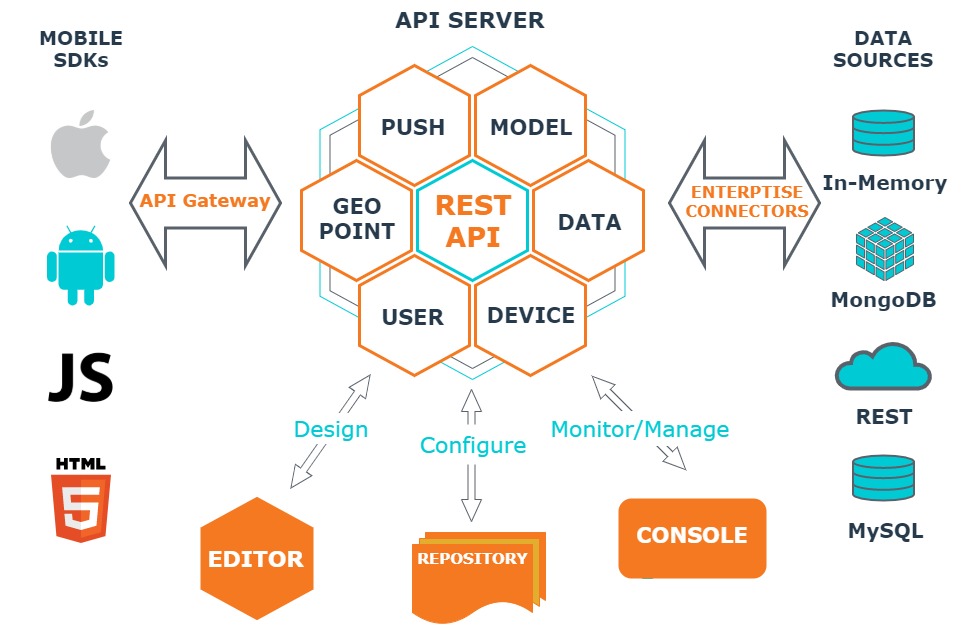
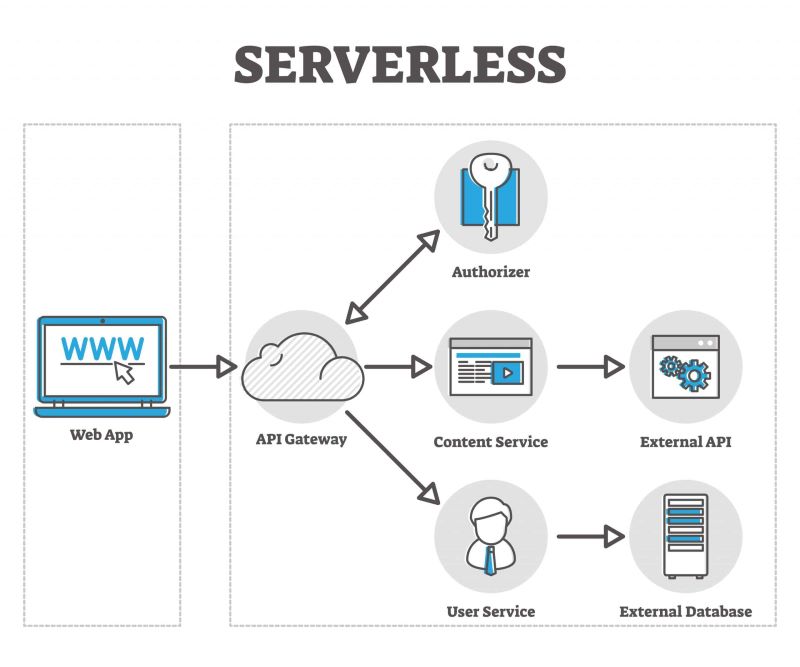
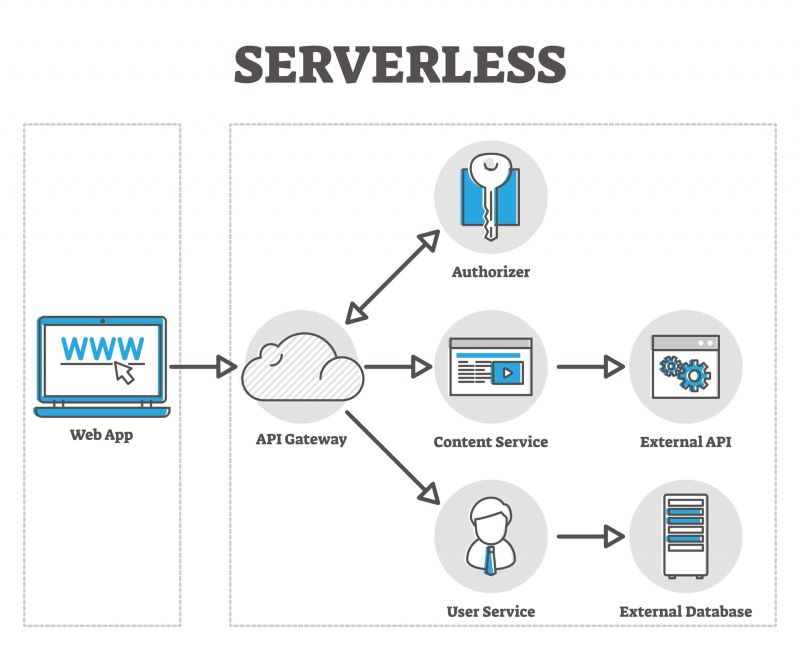
At its core, serverless doesn't mean no servers; it means you don't manage them. Services like AWS Lambda, Google Cloud Functions, and Azure Functions run your code in response to events, charging only for execution time. For APIs, this pairs perfectly with API gateways that route requests to functions, ensuring seamless integration.
Why Choose Serverless for Your APIs?
The appeal of serverless lies in its simplicity and efficiency. First, scalability is automatic. Traditional servers require manual scaling or auto-scaling groups, but serverless functions scale instantly with demand—from zero to thousands of concurrent requests—without overprovisioning.
Second, cost savings. You pay per invocation, not for idle servers. For APIs with variable traffic, this can slash bills by 60-90% compared to always-on instances.
Third, faster development. No need for DevOps tasks like patching OS or configuring load balancers. Developers write functions in languages like Node.js, Python, or Java, deploy them, and connect to databases or other services.
Other benefits include built-in high availability, as providers replicate across regions, and easier integration with managed services like databases (e.g., DynamoDB) or authentication (e.g., Cognito).
However, serverless isn't for everything. Long-running tasks or stateful apps might need workarounds, but for stateless APIs, it's a game-changer.
Getting Started: Building a Simple Serverless API
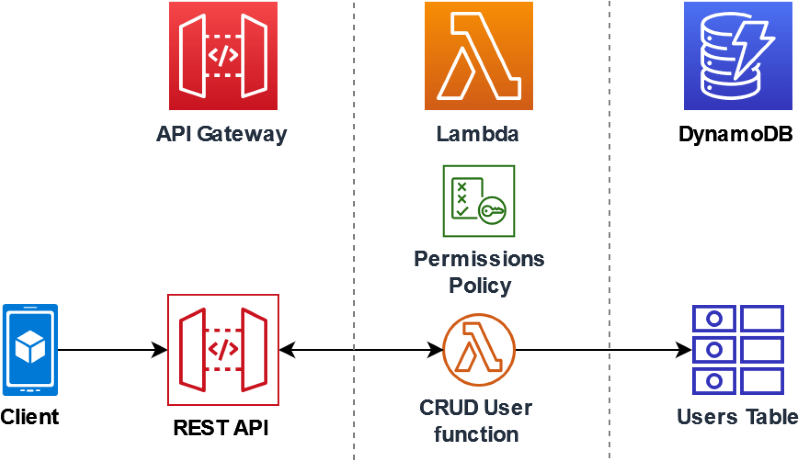
Let's walk through building a basic CRUD API using AWS, a popular choice for its maturity and ecosystem. Assume you have an AWS account.
- Set Up API Gateway: This acts as the front door. In the AWS console, create a new REST API. Define resources (e.g., /users) and methods (GET, POST, etc.).
- Create Lambda Functions: For each endpoint, write a Lambda function. For example, a GET /users function in Node.js:
exports.handler = async (event) => {
  // Simulate fetching users from a database
  const users = [{ id: 1, name: 'Alice' }, { id: 2, name: 'Bob' }];
  return {
    statusCode: 200,
    body: JSON.stringify(users),
  };
};
Deploy this via the console or CLI (e.g., aws lambda create-function).
Now, let's add a POST /users example in Node.js to create a new user:
const AWS = require('aws-sdk');
const dynamo = new AWS.DynamoDB.DocumentClient();

exports.handler = async (event) => {
  const body = JSON.parse(event.body);
  const params = {
    TableName: 'Users',
    Item: {
      id: Date.now().toString(),
      name: body.name,
    },
  };
  await dynamo.put(params).promise();
  return {
    statusCode: 201,
    body: JSON.stringify({ message: 'User created' }),
  };
};
For variety, here's the same GET /users in Python:
import json
import boto3

dynamodb = boto3.resource('dynamodb')
table = dynamodb.Table('Users')

def lambda_handler(event, context):
    response = table.scan()
    users = response['Items']
    return {
        'statusCode': 200,
        'body': json.dumps(users)
}- Integrate with API Gateway: Link the Lambda to your API method. Add authorizations if needed, like API keys or JWT.
- Add Data Persistence: Use DynamoDB for a NoSQL database. Grant Lambda permissions via IAM roles, then query it in your code (as shown above).
- Deploy and Test: Stage your API and get the invoke URL. Use tools like Postman to test endpoints.
This setup handles scaling automatically—Lambda provisions containers as needed.
For other platforms: Google Cloud uses Cloud Functions with API Gateway, while Azure Functions integrate with Azure API Management. The principles remain similar.
Best Practices for Mastering Serverless APIs
To avoid pitfalls, follow these tips:
- Keep Functions Lean: Aim for single-responsibility functions. Cold starts (initial latency) are minimized with smaller codebases—under 50MB zipped.
- Handle State Wisely: Use external stores like Redis for caching or S3 for files. Avoid in-memory state across invocations.
- Monitor and Optimize: Tools like AWS X-Ray trace requests. Set alarms for errors or throttles. Optimize by warming functions or using provisioned concurrency.
- Security First: Implement least-privilege IAM, validate inputs to prevent injections, and use WAF for API Gateway.
- Testing: Unit test functions locally with frameworks like Jest. For integration, use SAM CLI for AWS.
- CI/CD Integration: Automate deployments with GitHub Actions or AWS CodePipeline.
Common challenges include vendor lock-in (mitigate with multi-cloud wrappers) and debugging distributed systems (use logging extensively).
Conclusion
Mastering serverless APIs empowers you to build scalable, cost-effective backends without infrastructure hassles. By leveraging platforms like AWS, you can focus on innovation, deploying features faster than ever. Start small, iterate, and watch your API handle growth effortlessly. Whether you're a startup or enterprise, serverless is the future of backend development.